How To Only Edit Audio Pitch in CapCut? A Complete Step-by-Step Guide 2026
How To Only Edit Audio Pitch in CapCut — this question comes up a lot. And I totally get why. You are editing your video, and the audio just does not sound right. The voice is too high. The background track feels off. You want to fix the tone but you do not want to mess with the speed or volume. You just want the pitch.
Good news? CapCut Pro can do exactly that. I have used this app for a while now, and honestly, the pitch tool is one of my favorite features. Most people scroll right past it. But once you find it, everything changes. So let me walk you through it — step by step, no confusing terms.
How To Only Edit Audio Pitch in CapCut — let’s get into it.
What Is Audio Pitch and Why Does It Matter?
What makes one sound seem higher than another is its pitch.Think of a cartoon character — that fast squeaky voice is super high pitch. A movie trailer narrator with a deep serious tone? That is low pitch.
When you make videos, pitch changes the whole feel of your audio. A funny skit needs that silly high voice. A travel vlog feels better with calm, natural sound. The cool thing about CapCut is that it keeps pitch and speed completely separate. On many apps, changing pitch also shifts the speed. CapCut does not do that. You get to adjust the tone without anything else going off track. That is a big deal.
How To Only Edit Audio Pitch in CapCut on Mobile? (Android and iOS)
This works on both CapCut for Android and iPhone. The steps are nearly identical on both.
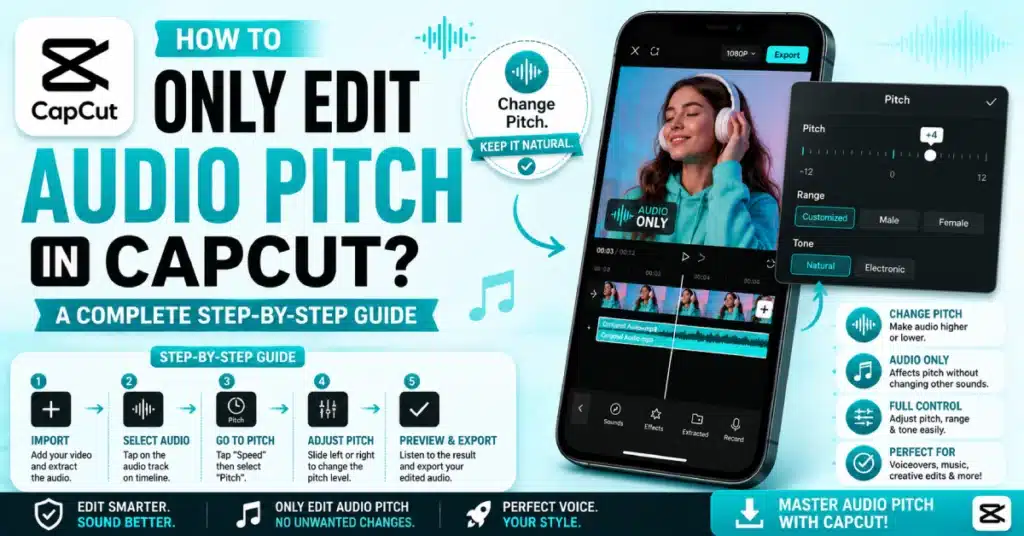
Step 1 – Open the App and Start Your Project
Open CapCut, tap “New Project,” pick your video from the gallery, and tap “Add.” Your clip loads into the editing timeline.
Step 2 – Add Your Audio
Already have audio? Skip this.No audio in project? Use **”Add Audio”** button at bottom. Pick audio. Add to timeline.
Step 3 – Select the Audio Clip
Tap directly on the audio clip in the timeline — not the video. You will see a colored border around it when it is selected. That is important. If you tap the video by mistake, the Pitch option will not appear.
Step 4 – Find and Tap Pitch
Look at the bottom toolbar and swipe left. Keep swiping until you see “Pitch.” Tap it.
Step 5 – Adjust the Slider
A slider pops up. Drag right for a higher tone, drag left for a deeper sound. You will hear live audio feedback as you move it. Stop when it sounds right.
Step 6 – Save and Export
Tap “Done” or the checkmark to confirm. Then export your video when ready. The speed has not changed. Only the pitch movedWhen you do this thing for the time it is slow.. When you do this thing again this thing really takes only about 20 seconds to do.
How To Only Edit Audio Pitch in CapCut on PC and Mac?
The CapCut screen, on a computer is different.. The way you use CapCut on a computer is the same. You do the things in CapCut on a computer.
- To start, CapCut and click “New Project”.
- Import your video. Drag it to the timeline.
- Need sound? Click “Audio” on the side. Choose your file.
- Then click directly on the audio clip in the timeline — not the video.
- A settings panel will appear on the right side of your screen.
- Find the Pitch slider there. Drag it up to raise the tone or down to lower it. Speed stays untouched.
- Press play to preview, then hit Export when you are done.
CapCut Audio Settings — Quick Reference Table
| Setting | What It Does | Affects Speed? |
| Pitch (Higher) | Raises the tone, sounds sharper | No |
| Pitch (Lower) | Drops the tone, sounds deeper | No |
| Speed | Changes playback rate | Yes |
| Volume | Makes audio louder or quieter | No |
| Fade In/Out | Gradual start or end of audio | No |
Pitch is its own thing. Completely separate from everything else. You can change it without touching speed or volume at all.
Tips That Actually Help
I have made mistakes with this tool, so let me save you some time.
- Always preview before exporting. What sounds good on phone speakers can sound strange through headphones. Take a second to properly listen.
- Start small. I usually go no more than plus or minus 3 or 4. Big shifts make voices sound robotic and fake.
- If the Pitch option is missing, you are probably on an older build. The CapCut Old Version sometimes lacks newer tools — update the app and it should appear.
- For background music, a tiny pitch shift like plus 1 or 2 can add energy without sounding weird.
Editing Voice Pitch Without Touching the Music
This comes up a lot. You have a voiceover and background music. You want to raise the voice pitch but leave the music alone. CapCut handles this perfectly because each audio layer is independent.
You should put the voiceover on its track separate from the background music so you can work on it easily. . Tap only on the voiceover clip. Apply the pitch change to just that clip. Leave the music track alone. Two tracks, two separate controls. That is it. This is one of the reasons creators love using CapCut Pro APK — the multi-track audio control is just really clean.
Want More Audio Features? Try CapCut Pro
The free version of CapCut is solid. But if you want more, CapCut Pro APK gives you advanced voice changers, extra audio effects, and finer controls. Some users go for CapCut Mod APK to unlock pro features — just make sure you download from a trusted source. For the official pro experience, the CapCut Pro APK Download page has everything you need.
Does Pitch Editing Affect the Video?
Short answer — no. Not even a little.
Pitch changes in CapCut are audio-only. Your video resolution, frame rate, and length stay exactly the same. The sync between your audio and video also stays intact. A lot of people worry about this. They think the audio might shift out of place. It does not. CapCut is clean about it.
If you want the latest audio tools and smoothest experience, try CapCut Pro APK Download Latest Version on your Android device. And if you are on iPhone, CapCut for iOS has the same pitch feature available too.
What If You Cannot Find the Pitch Option?
This happens sometimes. You select the audio and just cannot see Pitch anywhere. Here is what to check.
The pitch feature is available on most recent versions of capcut. If it is missing for you — make sure you tapped the audio clip and not the video. On desktop, the right panel only appears when the audio clip is actively selected.It’s an idea to check if CapCut needs an update. Open the App Store. Play Store and update it if you need to. Still missing? Uninstall and reinstall. That usually sorts it out.
Conclusion
So that is the full picture. How To Only Edit Audio Pitch in CapCut is actually very simple once you know where to look. Select your audio clip, find the Pitch slider, move it to where it sounds right, and done. Nothing else changes. Just the tone.
Try it on your next video.The pitch of your content is really important.Just a little pitch adjustment can make your content sound very different.
Frequently Asked Questions
How To Only Edit Audio Pitch in CapCut without changing speed?
Tap your audio clip in the timeline, scroll the bottom toolbar to find “Pitch,” and drag the slider. CapCut keeps pitch and speed as completely separate controls. Your playback speed will not change at all.
Where is the Pitch option in CapCut on mobile?
After tapping your audio clip, swipe the bottom toolbar left. The Pitch button is a few swipes in. Tap it and a slider appears to adjust tone up or down as you like.
Can I change pitch on just the background music?
Yes. Click your background music clip in the timeline and use the Pitch slider. It works on each clip independently. Your voiceover or other audio tracks are not affected unless you select them too.
Will changing pitch affect video quality?
No. Pitch editing only changes the audio tone. Video resolution, frame rate, and quality stay completely untouched. Your audio and video sync also stays perfectly in place.
Is the pitch tool free in CapCut?
Yes, the basic pitch slider is free for all users. Some advanced voice effects may need a Pro subscription, but the standard pitch control is available to everyone at no cost.
Does pitch editing work the same on CapCut desktop?
Yes. Select your audio clip in the timeline, then find the Pitch slider in the right-side settings panel. It works exactly like the mobile version with the same control range.
Ready to try it? Open CapCut right now, load a clip, and experiment with How To Only Edit Audio Pitch in CapCut. Even one small adjustment can transform the energy of your audio. Go give it a shot — you will not regret it.