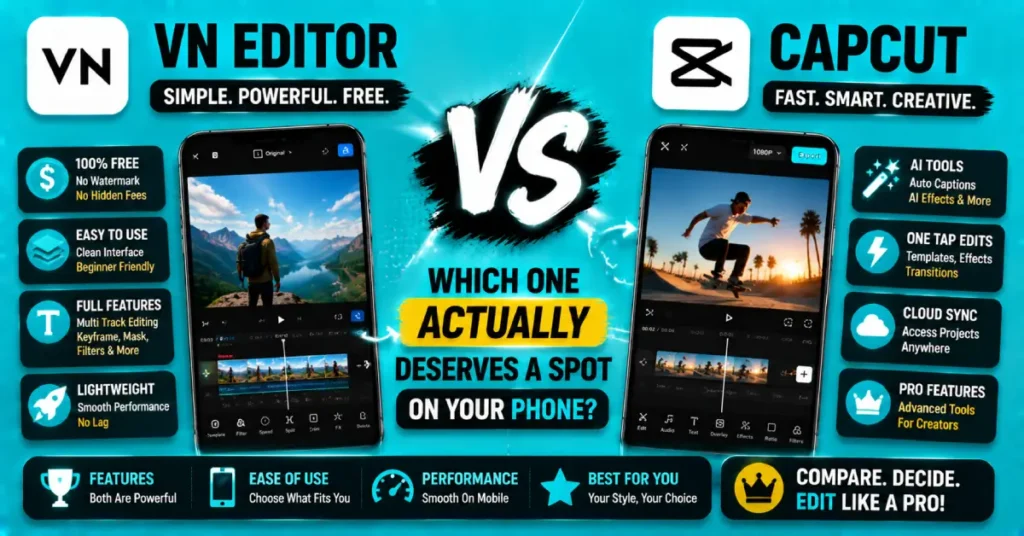
VN Editor Vs CapCut: Which One Actually Deserves A Spot On Your Phone
VN Editor Vs CapCut – Ask ten creators this and you’ll probably get eight different answers, honestly. Both apps live in that “free mobile editor” space, both have loyal fans, and both keep popping up in every “best editing app” list you scroll past. But the moment you actually sit down to edit something, the differences show up fast, and picking wrong just wastes your evening.
Here’s the real issue though. Most comparisons online just list features side by side and call it a day. That doesn’t tell you much when you’re the one stuck between two apps at 9pm trying to finish a video before bed. So let’s actually get into VN Editor Vs CapCut properly — what each one does well, where they fall short, and which one probably fits how you actually edit.
Quick preview of what’s ahead:
- What makes each app different at its core
- A comparison table you can scan fast
- Specific answers for phone users, PC users, and Reddit lurkers
- The FAQs people keep typing into search bars about this exact topic
What Is VN Video Editor?
VN, stands for VlogNow, started as a fairly quiet app that slowly built a strong following among mobile creators who wanted more manual control than most free editors offer. No watermark, keyframe animation, color curves, LUT support — stuff you’d normally expect only in desktop software. It feels less template-driven than CapCut and more like a lightweight version of a proper NLE.
That said, it does ask a bit more patience from you. The interface isn’t as instantly intuitive, and there’s a slight learning curve before things click. Once they do though, a lot of creators find they never really go back to app-hopping for effects.
What Is CapCut?
CapCut, on the other hand, leans hard into speed and trends. Templates, auto-captions, one-tap effects, a whole library built around whatever’s currently viral — that’s the whole appeal. The official CapCut app runs on Android, iOS, PC and Mac, and honestly, for quick reels and shorts, it’s tough to beat on convenience alone.
Where CapCut Pro trades away some manual control, it makes up for in raw speed. You’re not fighting the interface, you’re just tapping through a workflow that mostly does the thinking for you.
VN Editor Vs CapCut: Feature Comparison
| Feature | VN Editor | CapCut |
| Manual Control | Deep — curves, keyframes, LUTs | Basic, template-focused |
| Learning Curve | Moderate | Beginner-friendly |
| Templates | Fewer, less trend-focused | Huge trending library |
| Watermark | None, even free | None |
| Platform | Android, iOS, PC | Android, iOS, PC, Mac |
| Best For | Colour-focused, manual edits | Fast reels and trends |
This CapCut vs VN Editor breakdown makes the split pretty clear. One’s built for creators who want control, the other’s built for creators who want speed.
VN Editor Vs CapCut For Phone Users
For most casual users editing straight from their phone, VN Editor vs CapCut phone comes down to patience versus polish. VN gives you finer control over color and pacing, but you’ll spend a bit more time getting there. CapCut gets you a finished, trend-ready video faster, just with less room to fine-tune the details afterward.
- Want quick reels done in minutes? CapCut wins
- Want manual colour control on your phone? VN wins
- Want both, depending on the project? Keep both installed
VN Editor Vs CapCut For PC
On desktop, VN Editor vs CapCut for PC gets a little more even. CapCut’s desktop version brings its trend-focused templates to a bigger screen, while VN’s PC build keeps that same manual-editing depth people love it for on mobile. If you’re doing color-heavy work, VN’s curves and LUT support translate really well to desktop. If you’re churning out shorts fast, CapCut’s desktop templates still save more time overall.
VN Editor Vs CapCut Vs Inshot
Throwing Inshot into the mix, CapCut vs Inshot vs VN video editor shows an interesting middle ground. Inshot sits between the two — simpler than VN, less trend-driven than CapCut, decent for quick trims and basic text overlays but missing the deeper tools either of the other two offer. For CapCut vs VN vs Inshot purely on features, most serious editors land on either CapCut or VN depending on their priorities, with Inshot usually reserved for the simplest jobs.
Capcut Pro Vs VN Video Editor: Pricing
Cost-wise, CapCut Pro vs VN video editor stays close. Both offer solid free tiers, and VN Editor vs CapCut cost comparisons usually show neither app forcing you to pay just for basic exports. CapCut Premium includes extra templates and stock assets, while VN’s paid version mainly offers advanced export settings and extra effect packs. Neither app feels too aggressive with paid features, which is a welcome change from many editing apps.
VN AI Video Editor Vs CapCut
CapCut has leaned harder into AI tools recently — auto-captions, smart cutout, script-to-video features. VN’s approach to VN AI video editor vs CapCut comparisons is more restrained, focusing its energy on manual precision rather than automation. You should choose CapCut if AI is really important for your work. If you like to edit every detail of your videos yourself then VN is still a choice because it is a capable video editor with strong features.
What Reddit Says About Both Apps
If you take a look at what people’re saying about VN Editor and CapCut on Reddit you will see that a lot of people think the same thing. People who like to play around with colors and edit things by hand usually like VN Editor while people who want to edit things and make videos that are popular usually like CapCut. Most people say that the best app is the one that fits your style of editing.
Downloading Both Apps
Getting either one set up takes a couple of minutes. For CapCut specifically, the CapCut Play Store listing covers Android, and PC or Mac users can grab it straight from CapCut’s own site. Once installed, exploring the CapCut Premium template pack early on saves a good bit of trial and error later.
Mostly edit videos on your phone? The CapCut APK package offers setup on Android or iOS. CapCut for Android and CapCut for iOS make editing.
Is CapCut The Best Editing App?
Depends who’s asking, honestly. Is capcut the best editing app for someone chasing daily trends and fast turnaround? Probably, yeah. Is it the best pick for someone who wants deep colour control and doesn’t mind a slower workflow? Not really — VN edges it out there. “Best” really just depends on what you’re optimising for.
VN Video Editor Vs CapCut Which Is Better
At the end of the day, VN video editor vs CapCut which is better isn’t a fair question without context. For speed and trend content, CapCut. For manual precision and color work, VN. A lot of creators genuinely keep both installed and switch depending on the project, which honestly makes more sense than forcing yourself to pick just one forever.
Getting Set Up With VN Editor Vs CapCut Download
If you’re downloading both to compare firsthand, vn editor vs capcut download is straightforward on either app store. Try a small project on each — same clip, same length — and you’ll feel the workflow difference within ten minutes, way faster than reading any comparison article, mine included.
Wrapping Up
So, VN Editor Vs CapCut really comes down to what kind of editor you are. Want speed, templates, and trend-ready exports? CapCut’s your app. Want manual control, curves, and a bit more creative depth? VN deserves your time instead. Either way, both are solid enough that you can’t really go wrong.
Ready to pick one and get editing? Download CapCut Latest Version if speed’s what you need today, and give it a proper try.
Frequently Asked Questions
Is VN Editor better than CapCut for beginners?
Not really — CapCut is generally easier for beginners thanks to its templates and simpler interface. VN provides more manual editing features, although beginners might find the learning process slightly more challenging.
Does VN Editor have a watermark on free exports?
No, VN does not include a watermark in the version. Creators widely use VN who want looking exports without paying for premium access to VN.
Which app has better templates, VN or CapCut?
CapCut stands out for its large template library. It is updated regularly with trending styles, while VN puts more focus on manual editing tools that help you create your own unique style.
Can I use both VN Editor and CapCut together?
Yes, plenty of creators do. Some edit colour and pacing in VN, then finish captions or trending effects in CapCut before exporting. Using both isn’t unusual and often covers gaps either app has alone.
Is CapCut or VN better for colour grading?
VN generally offers stronger colour grading tools, including curves and LUT support, similar to desktop software. The color tools that CapCut has are straightforward and easy to use which makes them great for making edits to your video but if you need to do really detailed grading you will not have as much control as you would like.
Which app is more beginner-friendly on PC?
CapCut feels more beginner friendly on PC since its layout closely matches the mobile app. VN provides more advanced editing options, but its desktop interface may seem harder for first time users.
Still deciding? Try both for a week and see which one actually fits how you edit — that’s the real answer to VN Editor Vs CapCut anyway.